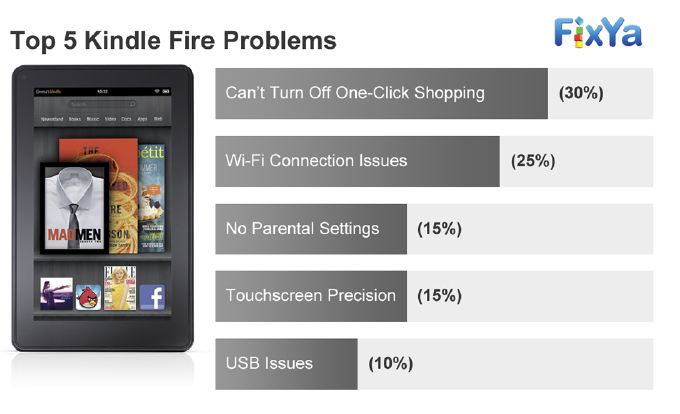
 The Amazon Kindle Fire is not without problems. According to a FixYa most are fixable problems while a few that can't be fixed exactly. FixYa compiled the top worst problems on the Kindle Fire from its user-base and offered solutions.
Of course the initial issue that we reported last year, One-click buying by users without the owners permission was the top problem. Amazon has promised a solution which has not been released, yet. Other issues include Wi-Fi connections, parental control, touchscreens and computer connection problems.
Top Kindle Fire Issues and Solutions/Fixes
- One-Click Shopping (30%) When one-click shopping is enabled, when someone else uses the Kindle fire, they can order Amazon products. there is no direct fix for the issue (although Amazon has signaled that they are working on one), aside from password protecting your Wi-Fi connection with a password.
- Wi-Fi Connection Issues(25%) The Kindle Fire’s Wi-Fi has been plagued with significant issues from the start. Updating Kindle software to the latest version has a 30 percent chance of solving a Wi-Fi related issue.
- No Parental Settings(15%): A common issue owners have with their Kindle Fire is the lack of parental controls for children safety. Setting a Wi-Fi password only solves this problem for web browsing.
- Touchscreen Precision - this is a hardware problem and FixYa offers no solution.
- Computer not recognizing the Kindle Fire: Sometimes file transfer is difficult when the computer doesn't recognize the Kindle Fire. There's not a lot of storage therefore people want to offload content they are not using any more. Unplugging the Kindle Fire from the USB and then try to connect to another USB on the computer can help. Auxilary USB ports on a keyboard may not have enough power to recognize the table. Another option is to to reset the Kindle Fire and reconnect it. Lastly, shut off the computer and reboot it with the Kindle Fire attached.
New Kindle Fire owners can view free Amazon Prime videos for a month for free when you buy the Amazon Kindle Fire.
A recent survey by ChangeWave Research showed increased popularity of Amazon and the Amazon Kindle Fire amounting to a whole lot of revenue, satisfaction and profits.
The Kindle Fire was hottest selling and most-wished-for item on Amazon and named the most-gifted-promoted tablet by Wireless and Mobile News. Kindle Fire sales are predicted to beat all other tablets in 2012.
Toss Sandler at RBC Capital surveyed Kindle Fire owners. He analysed profit areas for Amazon and found that people who bought the Fire primarily use it for reading ebooks, then browsing and gaming.
The Kindle Fire received an update that helped fix some problems.
The best features of the Kindle Fire are the dual-core processor, free Amazon Cloud storage, cloud accelerated mobile browser and of course the $199 price. Previously reviewed shortcomings of the Kindle Fire include it uses Android 2.3(not a tablet OS) and lacks Bluetooth, cellular data, a camera and GPS. The Kindle Fire touchscreen is only 7 inches.
I( just bought a Kindoolw Fire and DO NOT know how to even turn it on, much less use it. Yes, I plugged it in, so it has the power that's needed.
HELP.
On a similar note,, Tablets have turned into the best and newest "must have" gadget to unique, and for very good reason. They are light-excess weight, quite moveable, uncomplicated to use and visually great!